The Employee Action Report allows Owners and Managers to track 43 different actions in AURA, such as changing a clock out time or removing an employee's block and includes the location, employee, date, and time the action was performed.
Navigating to the report
1. Ensure you are logged in with an Owner or Manager level account
2. Select "Reports".
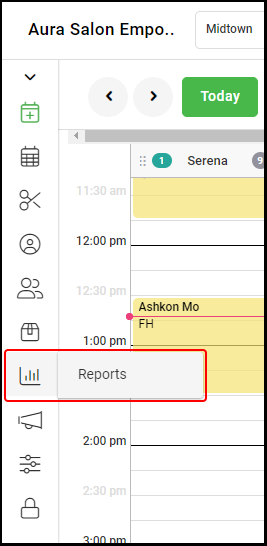
4. Select "Employee Action".

Employee Audit Report Overview
1. Use the location selector to view the report by a specific location or by all locations.
2. Use the Date Picker to choose the date range to be viewed. Select a single day twice to view a single day.
3. Select from the "All Employees" drop down filter to view the report by all or by a specific employee
4. Select "All Actions" to view the report by all or by a specific Action Type. The available action types are the following:
Book Appointment - an appointment is booked by an Employee
Edit Appointment - an appointment's date, time, or provider is edited
Delete Appointment - a service is deleted from an appointment
Voided Ticket - a ticket is voided
Refunded Ticket - a ticket is refunded
Remove Appointment - an appointment is canceled
Check Out - an employee selects the Ready to Pay button
Add Service - a service is added to an appointment via the booking form or ticket
Edit Service - a service is edited via the ticket
Processed Ticket Time - a service start time was added or edited on a ticket that has been checked out
Removed Service - a service is removed from an appointment
Clock In Time - clock in time is changed
Clock Out Time - clock out time is changed
Hours Worked - total hours worked for a shift is changed
Hours Worked Notes - the note on a shift is changed
Schedule Change - an employee's schedule is changed
Remove Day - a day is removed from an employee's schedule
Delete Removed Day - a removed day is deleted
Add Day - a day is added to an employee's schedule
Delete Added Day - an added day is deleted
Add Block - a block is added
Delete Block - a block is deleted
Employee Profile Updated - an existing employee's profile is updated
Smart Booking Updated - smart booking timing adjusted for a client
Formula Updated - a client's formula is updated
Client Note Updated - a client's note is updated
Gift Card Balance - a gift card balance is edited
Gift Card Comment - a gift card comment is edited or added
Processed Ticket Tip - the tip on a processed ticket is edited
Processed Ticket Provider - the provider for a service on a processed ticket is edited
Create Purchase Order - a purchase order is created
Edit Purchase Order - an existing purchase order is edited
Submit Purchase Order - a purchase order is submitted
Receive Purchase Order - a purchase order is received
Restock Purchase Order - a purchase order is restocked
Inventory Adjustment Create - an inventory adjustment is created
Inventory Adjustment Edit - an existing inventory adjustment is edited
Inventory Adjustment Form - an inventory adjustment is submitted
Inventory Count Create - an inventory count is created
Inventory Count Edit - an existing inventory count is edited
Inventory Count Form - an inventory count form is submitted
Product Add - a product is added
Product Delete - a product is deleted
Product Edit - a product's data is edited
Supplier Deleted- a supplier profile is deleted
Petty Cash Withdrawal - a subtraction petty cash transaction is created
Petty Cash Addition - an additional petty cash transaction is created
Tip Full Paid - a tip is paid in full via the tip jar
Tip Partial Paid - a tip is paid in part via the tip jar
Client Deleted - a client profile is deleted
Clients Merged - 2+ clients are merged
Walk-In Created - a walk-in ticket is created
Walk-In Taken - a walk-in is booked
Walk-In Ticket Deleted - a walk-in ticket is deleted
