We are excited to announce the following AURA Salonware system updates!
Promotion and Discount Updates
Promotions can be set up as a dollar amount from the Promotions Tab under Marketing.

Promotions and discounts are now applied to a specific line item rather than the service or retail total. Use the present icon next to the line item to display a list of eligible promotions.

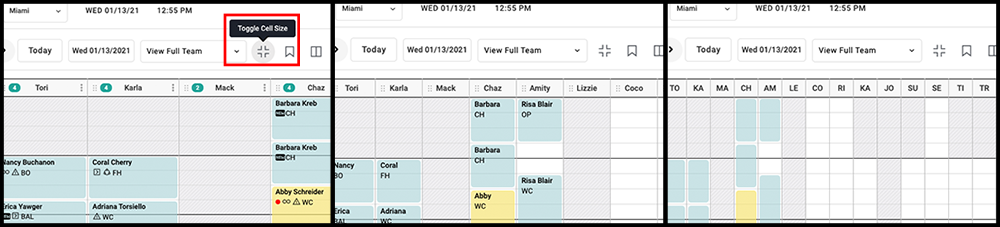
Toggle Cell Size on the Calendar
The calendar can be viewed at three different cell sizes on the Desktop application by selecting the Toggle Cell Size button.
Download Dashboard Information
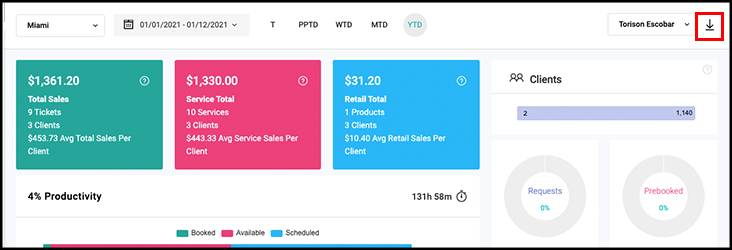
A .csv of the Dashboard can be downloaded by Owners, Managers, and Providers. Date range and salon/location/provider changes to the Dashboard affect the information in the Dashboard download. Providers can only download their information.
Total Liability Shown for Gift Cards
Owners and Managers may see the total number of and dollar amount for Gift Cards, Promo Cards, and Series by going to their respective lists in Marketing. These totals can be viewed for any date after 12-30-2020.

Future Booked Appointment Report
Owners and Managers can view the dollar amount of future appointments based on Provider and Service Category, as well as see future Prebooking and Request numbers. Access the report by going to Reports > Future Booked.

Inventory Count
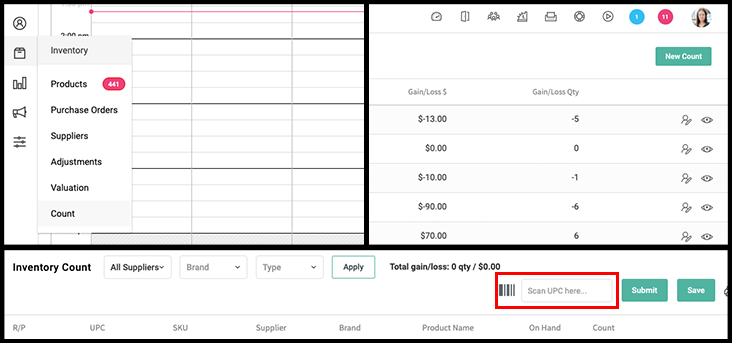
Owners and Managers can input an Inventory Count by going to Inventory > Count. The ability to input counts can be enabled for Reception. Scan UPC's continually into the field entitled "Scan UPC Here" to have them added to the count. A submitted Count becomes an Adjustment, which automatically updates the on-hand quantities of products.
Category Filter in Purchase Orders
Products in a Purchase Order can be filtered by their Category. The CSV download contains the Category field.

Display Tips on Provider Report and Dashboard
The Access setting Display Tips on Provider Report affects tip visibility on the Provider Dashboard as well.

Filter by Employee on Payroll Report
Owners and Managers can filter the payroll report by employee name.

Edit Product Cost in Purchase Order
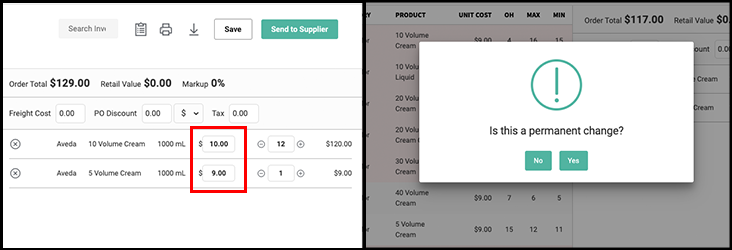
Owners and Managers can edit the cost of a product on a purchase order before submitting an order. The cost can also be edited on the restock page prior to restocking inventory. If the cost change is permanent then the cost of that product is updated in inventory, if it is not permanent then the cost of the product is not updated, but the Average Cost of the product in inventory is updated.
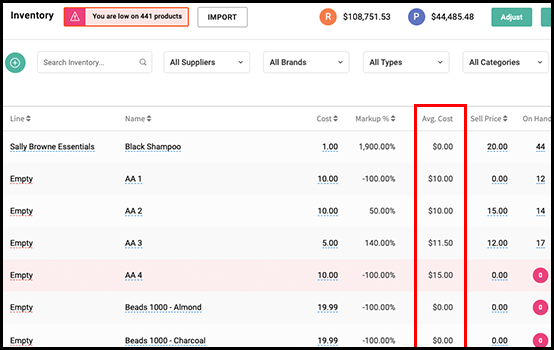
Average Cost Column in Products Tab
A column has been added under the Products tab to show the average cost of a product based on its received purchase orders.
Average Cost of Goods and Average Markup Percentage in Retail Report
The AVG COG column on the Retail Report tab is populated based on the avg cost of the product.

The Avg Markup % column on the Retail Report shows the markup percentage based on the Average Product Cost field on the Product tab whereas the Markup % column is based on the Cost field.

Gift Card Balance on Open Ticket
The client's total outstanding gift card displays on the open ticket. Tap the gift card icon to be directed to the Gift Card tab in the client file.

Manager Payroll Access and Manager Commission Access
Payroll and Commission Access for Managers are separate Access settings that an Owner can manage.

Booked and Paid Totals Access
Owners have the ability to hide or show the Booked and Paid totals in the provider app from Salon Settings > Access.

For more information regarding these new features or live support, contact support@aurasalonware.com