System updates include, but are not limited to:
Goals (NEW!)
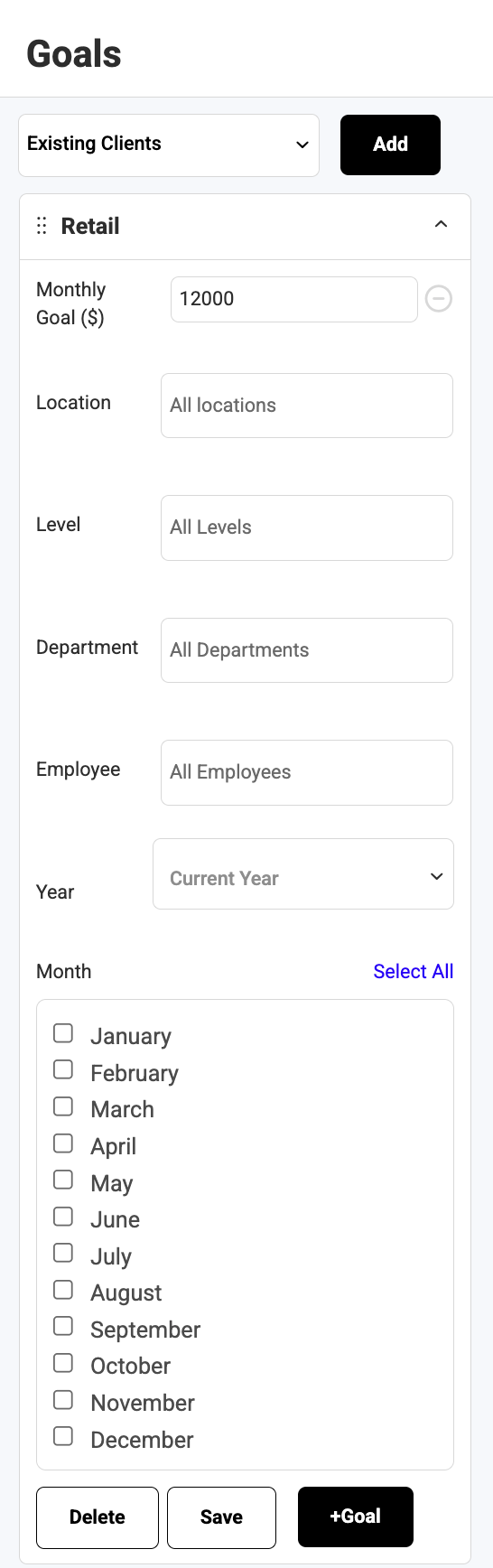
Take control of your salon’s performance with Monthly Goals—a powerful new way to set clear targets, track progress in real time, and keep every location and team member aligned around growth.
Whether you manage one salon or many, Monthly Goals give you instant visibility
into how your business is performing and where to focus next.
Set Goals That Drive Growth
Create monthly performance goals across your entire business or drill down to exactly where you want to improve:
- Company-wide goals
- Location-specific goals
- Department goals
- Individual provider goals
Full Visibility Across Locations
Running multiple salons? Monthly Goals make it easy to:
- See how each location is performing against its target
- Compare progress across locations at a glance
- Identify top-performing salons and areas that need attention
Provider Accountability (Without Micromanaging)
Assign goals directly to individual providers or team members and let them take ownership of their results
- Providers can view their own goals
- Track progress as they work
- Stay motivated by seeing exactly how close they are to hitting target
This creates alignment between ownership and staff—without extra meetings or manual check-ins.
Real-Time Progress, Always Up to Date
- Visual progress bars show how close you are to each goal
- Automatic updates as sales and activity happen
- Optional inclusion of future bookings for a forward-looking view
Stay Organized as You Scale
- Goals are clearly marked as Active, Completed, or Future
- Easily manage current targets while planning what’s next
- Built to scale with your business as you grow locations and teams
Head to Goals to create your monthly targets and start tracking performance across your entire business!
Appointment Confirmation Text Update:
We’ve updated appointment confirmation text messages to include the following
message: “Please contact the salon directly to cancel or reschedule.”
This message has been added to:
- Booking Confirmation
- First Appointment Confirmation
- Second Appointment Confirmation
Please note that "cancel" is a universal short code that can be used by consumers to halt receiving texts from a specific number. We are unable to change this in order to comply with carrier regulatory requirements, industry standards, and the Telephone Consumer Protection Act. This update ensures that clients are made aware that appointments cannot be canceled via confirmation text and they must contact the salon directly to make changes.
Campaign Recipient Filter Visibility Update:
When creating a text or email campaign, selected recipient filters are now
clearly displayed at the top of:
- Select Recipients page
- Review & Send page
Each applied filter is shown and can be removed directly without needing to rebuild the campaign.
This update improves your ability to navigate through campaigns with accuracy and ease.
Multi-Location Tax Display Options Update:
The Multi-Location Report has been enhanced to support viewing totals with tax or without tax, improving flexibility for accounting and operational use cases.