System updates include, but are not limited to:
Release Overview
This release introduces a new Service Recommendations feature in Online Booking, giving salons the ability to promote additional services during the booking process. Clients can easily discover and suggest add on services to their appointment, helping salons increase add-on revenue while creating a more personalized booking experience.
Feature Enhancement: Online Booking Service Recommendations
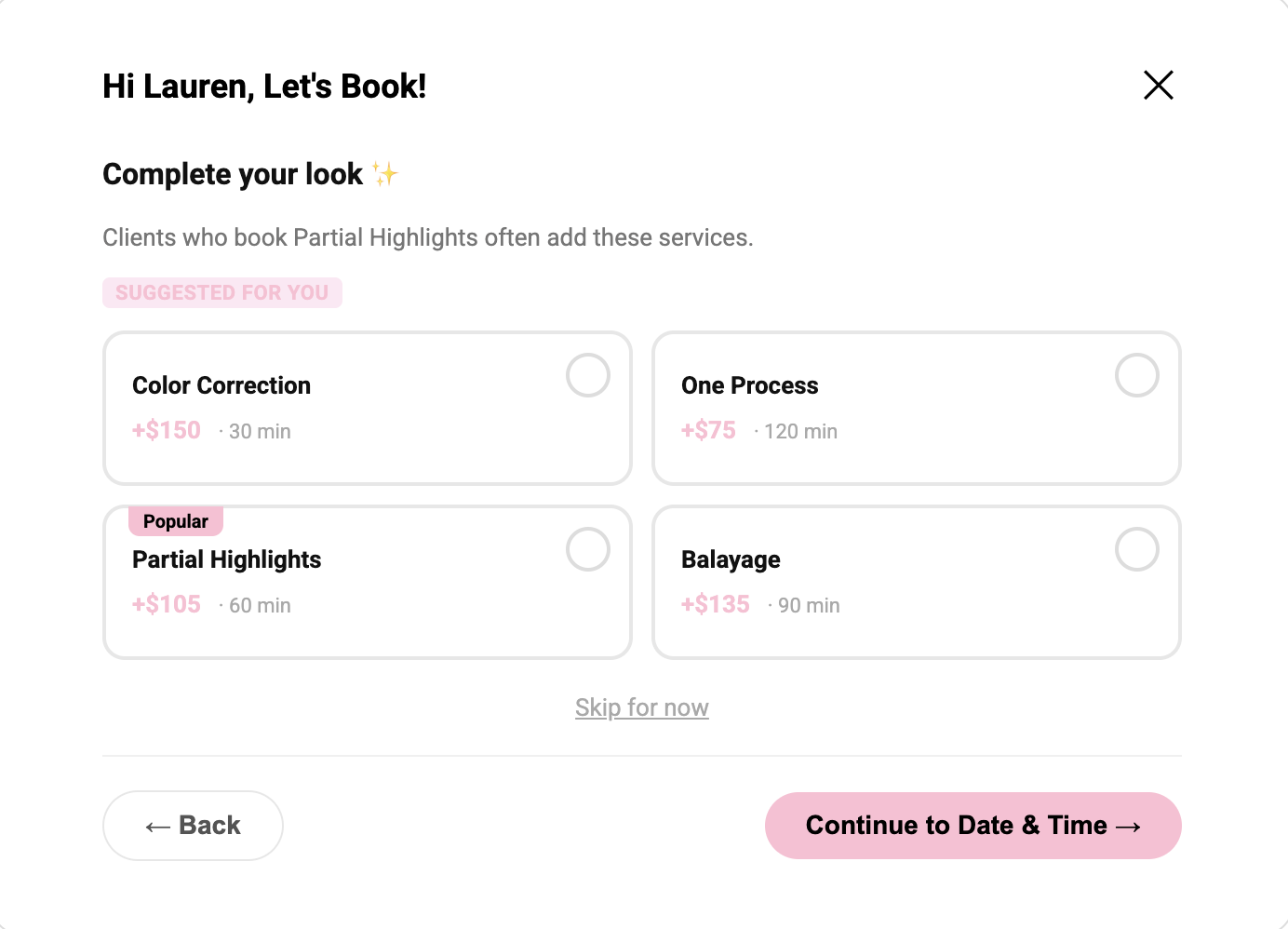
Promote Additional Services During Online Booking
Salons can now promote additional services directly within the Online Booking flow. Service Recommendations allow salons to highlight complementary services, giving clients the opportunity to enhance their appointment while helping salons increase add-on service revenue.
What’s New
- Add Recommended Services – Select additional services to promote when creating or editing a service.
- Relevant Recommendations – Recommended services are selected from the same service category to help highlight complementary offerings.
- Popular Service Highlight – Mark one recommended service as Popular using the star icon to increase visibility and encourage client selection.
- Recommendation Limit – Salons can add up to four recommended services per service.
- Provider Requirements – The provider must be assigned to both the original service and any recommended services selected by the client in order to complete the booking.
- Client Selection – During Online Booking, clients will see a dedicated Service Recommendations step where they can select one or multiple additional services.
- Automatic Scheduling – Selected services are automatically included in the appointment and scheduling process.
-
Intelligent Scheduling – Aura considers the combined duration of all selected services when determining appointment availability, helping prevent scheduling conflicts.
* Multi-provider booking enhancements are coming soon.
Benefits
- Increase average ticket value through strategic service upsells.
- Create a more personalized and engaging Online Booking experience.
- Promote seasonal, premium, or high-margin services at the right moment in the booking journey.
- Give salons control over which services are promoted to clients.
- Ensure appointments are scheduled accurately based on the total duration of all selected services.
- Help clients discover more of what your salon offers before completing their booking.
This enhancement helps salons make every Online Booking opportunity work harder by increasing service discovery, creating additional revenue opportunities, and ensuring appointments are scheduled correctly.
View Full Article
Feature Enhancement: Control Commission Information Displayed to Providers
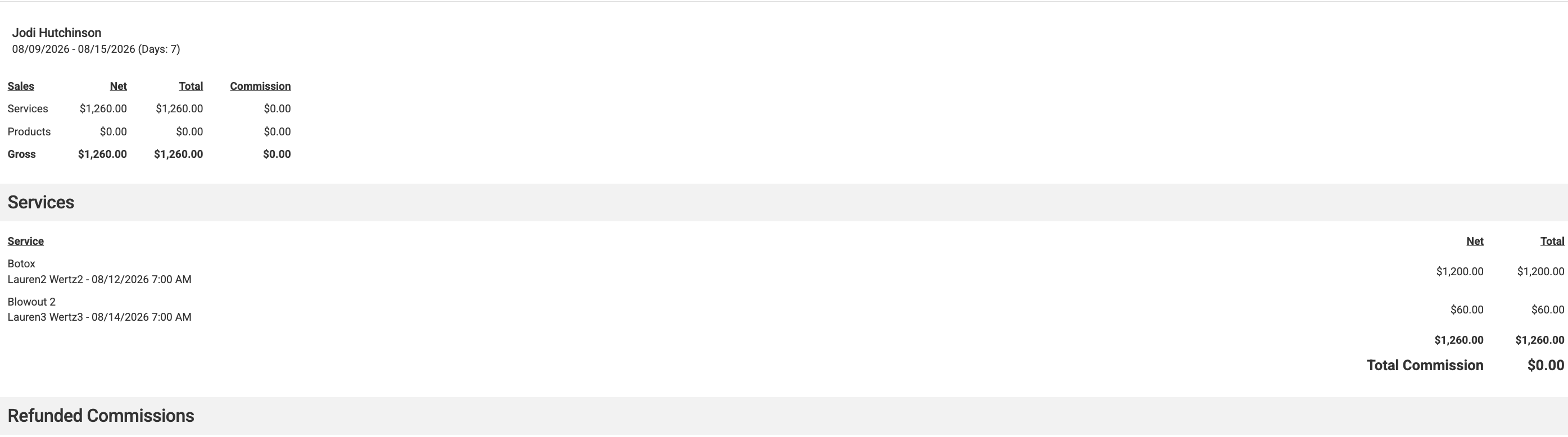
Salon owners now have more control over the information displayed to providers by choosing whether commission titles and percentages appear in the Provider View.
What’s New
A new setting has been added to Business Profile Settings:
Disable Commission Title on Provider View
When this setting is enabled:
- The commission title and percentage displayed beneath services are hidden from providers.
- Providers will continue to see transaction details for completed services without commission information.
- The setting is disabled by default, so commission information will continue to display unless the salon chooses to turn it off.
Benefits
- Control the visibility of commission information for your team.
- Customize the Provider View to align with your business preferences.
- Create a cleaner, simplified transaction view for providers.
View Full Article
Feature Enhancement: Custom Goal Names
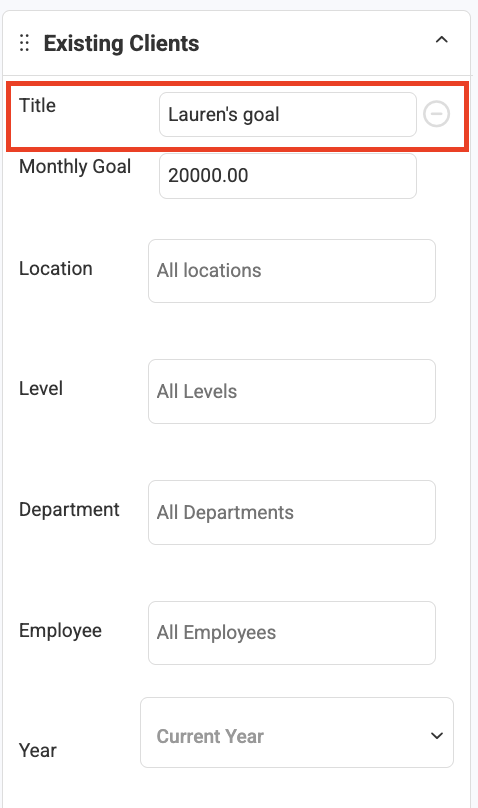
Personalize and Simplify Goal Tracking
Salons can now assign a custom name to each goal they create, making it easier to identify and track performance across the business.
What’s New
- Custom Goal Names – Assign a meaningful, business-specific name to each goal.
- Goal Cards – Goal cards now display both the Goal Name and Goal Type, making goals easier to distinguish at a glance.
- Improved Organization – Quickly identify and manage multiple goals with greater context.
Benefits
- Create meaningful names that align with your salon's objectives.
- Quickly identify goals by viewing the Goal Name and Goal Type together.
- Improve visibility and organization when managing multiple goals.
- Personalize performance tracking for promotions, service milestones, team performance, and other initiatives.
Feature Enhancement: Complete Client Deletion
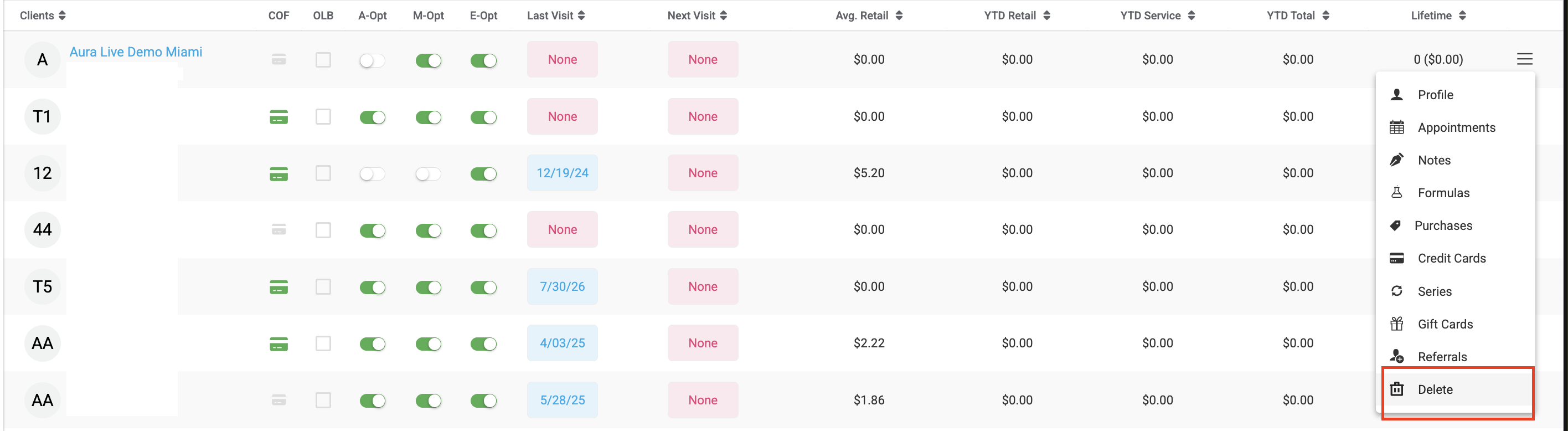
Remove Client Information While Preserving Historical Records
Deleting a client is now more comprehensive, helping keep the calendar clean while preserving historical business records.
What’s New
- When a client is deleted, Aura now removes all associated client profile information, along with past and future appointments, after the user confirms the action.
- The confirmation message has also been updated to clearly explain what will be removed:
- Delete [Client Name]? This will remove all user's profile information along with past and future appointments.
- Future Appointments – All future appointments associated with the deleted client are automatically removed from the calendar.
- Historical Appointments – The client's profile and appointments are removed.
- Historical Reporting – Completed transactions and historical revenue data remain available in reporting to preserve accurate sales, payroll, and financial records.
Benefits
- Automatically removes future appointments that could otherwise remain on the calendar.
- Prevents inaccessible appointments from blocking provider schedules.
- Preserves historical sales and reporting data for accurate business records.
- Provides a clearer confirmation message so users understand exactly what will be deleted.
View Full Article
Feature Enhancement: Improved Credit Card Fee Handling During Checkout
Keep Ticket Totals Accurate When Payments Change
Aura now automatically recalculates the ticket total when a credit card payment is canceled or when a partial payment is completed, ensuring the remaining balance is accurate.
What’s New
- Canceled Credit Card Payments – If a user selects a credit card payment method, including Manual Credit Card, but cancels before processing the payment, the temporary credit card processing fee is automatically removed. The ticket total is restored to its original amount when returning to the payment screen.
- Partial Payments – When a partial payment is completed using any payment method, Aura returns the user to the Select Payment Method screen with the remaining balance displayed without a credit card processing fee.
- Total Changed Message – The Total Changed message is cleared after a partial payment is completed.
Benefits
- Prevents credit card processing fees from appearing when no card payment is completed.
- Ensures the remaining balance reflects the correct amount after partial payments.
- Creates a smoother and more intuitive checkout experience.
- Reduces payment errors caused by incorrect ticket totals or processing fees.
Feature Enchantment: Service Quantity on Receipts
Receipts now display the quantity for service line items, making it easier for clients to see the number of units or services included in their purchase.
Bug Fix: Service Total Time Automatically Updates
Fixed an issue where the Total Time for a service did not automatically update when the individual timing components were changed.
What’s Fixed
When updating any of the following service timing fields:
- Application Time
- Processing Time
- Finishing Time
The Total Time will now automatically recalculate to reflect the combined timing.
This ensures the total service duration remains accurate whenever individual timing components are updated.
Bug Fix: Product Usage Fees When Merging Tickets
Fixed an issue where product usage fees were not correctly combined when merging tickets.
What’s Fixed
When merging two tickets that both include services with product usage fees, the fees are now combined correctly.
Example: A $10 product usage fee on one ticket and a $5 fee on another will now result in a $15 total product usage fee after merging.
This ensures all product usage fees are included in the final ticket total before checkout.