We are excited to announce the following AURA Salonware System updates!
Pricing Levels
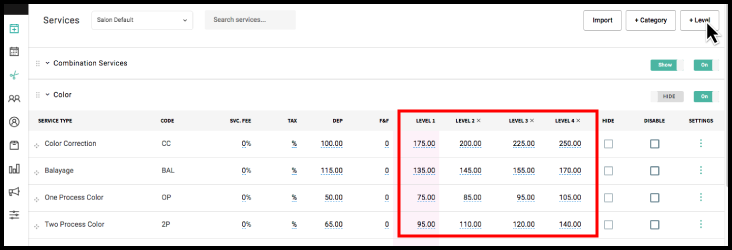
Owners and Managers can add pricing levels to the default service list. A new level may be added by selecting "+ Level" from the services tab.
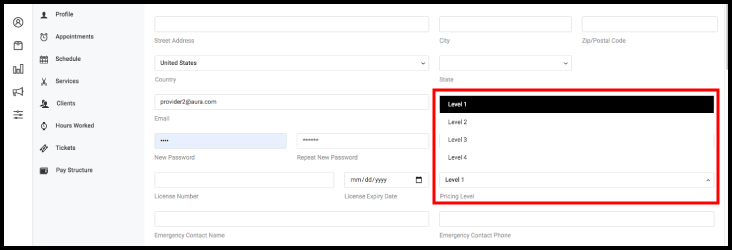
Pricing levels can be assigned to providers in their employee profiles. Assigning a level sets that employees default pricing to the level. If custom pricing has been entered in the employee's service list it must be removed for the level pricing to take effect.
Service Pricing Updates
Provider price changes will take effect immediately and update all future appointments. The price listed on the open ticket will reflect the provider's updated price rather than the price set a booking.
Track Promotions and Discounts on Client File
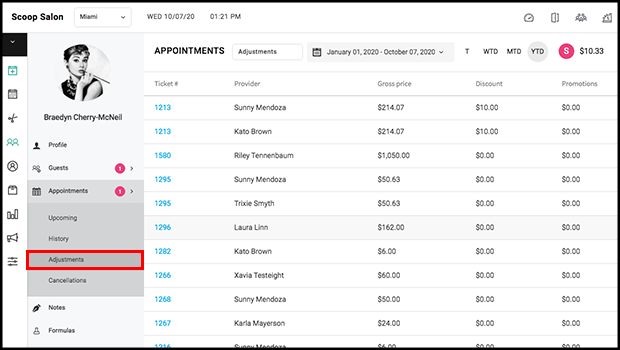
The history of promotions and discounts a client has received are tracked in the client’s file and may be seen by Owners, Managers, Reception, and Providers.
Track Cancellations on Client File
Cancellations can be tracked on a client’s profile under the appointment tab.

Automatic Clock Out Indicator on Payroll
When an employee forgets to clock out they are automatically clocked out at 11:59 PM by AURA. The employee’s hours then display in red on the Payroll Report. Selecting the red hours navigates to the Hours Worked for that employee.

Step Based Commission
Owners and Managers can choose sliding scale or step based commission in each tier by going to Salon Settings > Commissions.

Manager Access to Commissions
When "Manager Payroll Access " is unchecked, the Commission tab under Salon Settings will be hidden from Managers in addition to the payroll report.

Select Location
When a client is booking an appointment at a multi-location salon they must choose the location first.

Provider Price Pop Up Description Change
The provider price popup has been updated to say the provider’s price “starts at”. This pop up displays once a client selects a provider when booking an appointment.

Client Export File
The client export file that Owners can download includes the client's mobile phone number as well as the client’s first recorded paid visit.

The client export file that Owners can download includes the client's referral source.

Service Sales Per Hour
Service sales per hour calculation has been added the dashboard and is calculated by Total Service Sales ($) / Total Hours Available.

View Full Client File in Provider Application
Providers can view and edit the client profile by searching for the client if Hide Client Data from Providers is disabled.

SalonLock: Restrict Providers from Editing Appointment
Owners and Managers can choose to allow or restrict providers from editing appointments.
If checked, providers are still able to click the "edit" option on the client model to bring up the edit form and make changes to the appointment.
If unchecked, providers are prohibited from editing appointments, adjusting service times (Smartbooking), and canceling appointments.

SalonLock: Restrict Providers from Booking
Owners and Managers can choose to allow or restrict providers from booking appointments.
If checked, providers will still be able to book appointments.
If unchecked, providers will not be able to book appointments from a computer or mobile device.

Access: Restrict Providers from Editing Ticket Totals
Owners and Managers can choose to allow or restrict providers from editing ticket totals.
If checked, providers will continue to be able to apply discounts and edit totals on the tickets.
If unchecked, providers will no longer be able to do the following: Edit Service/Retail total on a ticket, apply a manual service/retail discount to a ticket, and remove a custom ticket fee on a ticket.

Client Profile: Hair Type Options
There are additional options to describe Clients Hair Types which include: Tight Curls, Loose Curls, Classic Curls, and Highly Textured.

Make an Existing Client the Guest of a Client
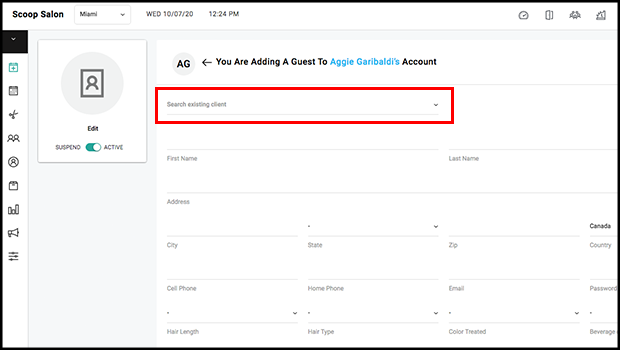
Owners, Managers, and Reception may add an existing client as the guest of another client. To do so, use the client search bar at the top of the "Add A Guest" screen. As a result, the primary account holder will receive all appointment notifications for the guest. In addition, they will be able to book appointments on behalf of the guest through the client application.
For more information regarding these new features or live support, contact support@aurasalonware.com