Aura Salonware will be releasing the following system updates on October 19, 2022
System updates include, but are not limited to...
Simultaneous Product Editing for Multi-Location Businesses
Edit your products' primary UPC, SKU, on hand quantity, minimum alert and maximum amount for all locations from one screen. Tap the table icon located on the top right corner of the product list and the min/max table will display. Access to edit the Min/Max table can be set by employee in the "Access" tab of their employee file.
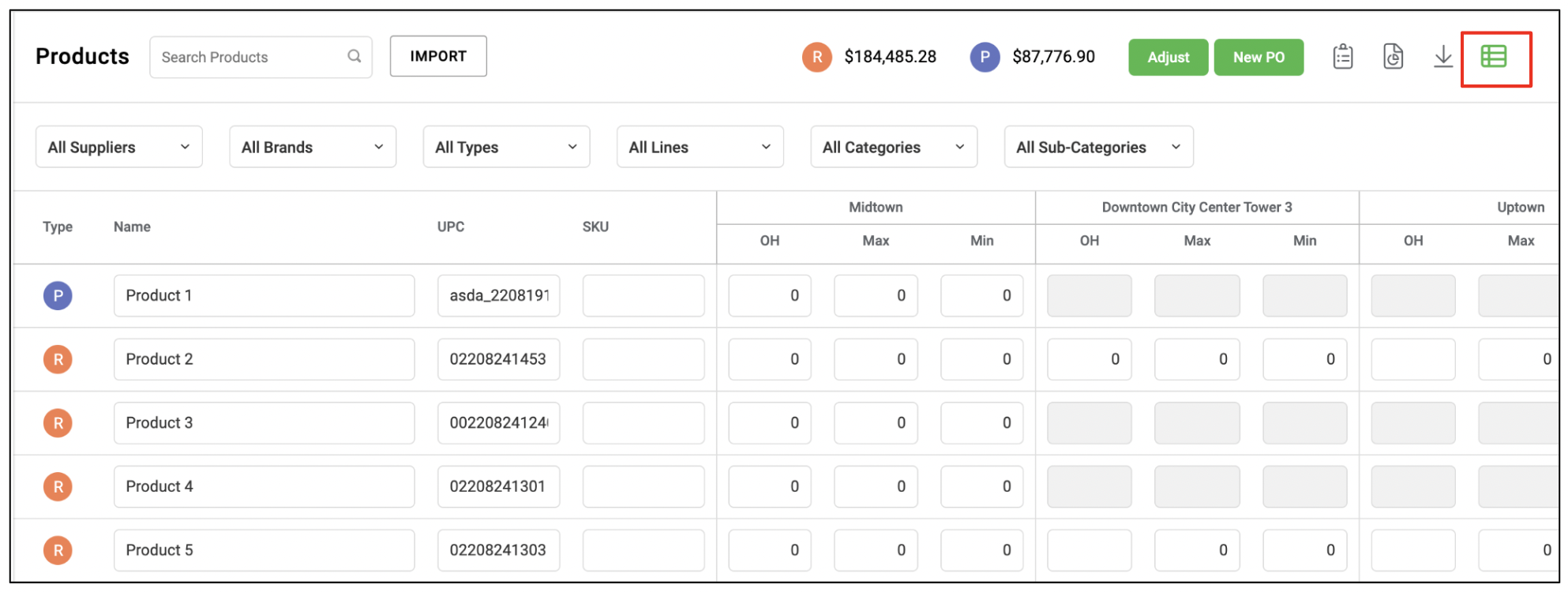
Multi-Location Inventory Updates
What's new:
After a field is edited in the product details pop-up, it will be highlighted in green to indicate what changes have been made before they are saved.
What's been updated:
If more than one location is selected in the product details pop-up, the minimum and maximums will populate with a dash to indicate they are non-editable from this modal.
Note: the ability to edit these details across all locations is now available in the simultaneous product editing table.
Curbside and Online Retail Updates
What's new:
Now you can choose between curbside and in-store pickup! Once this feature is activated, choose between curbside and in-store pickup via your client app settings.
Add a photo and description to your online retail products via the product details pop-up to help your clients easily find their favorites.
CLIENT VIEW:
What's been updated:
The ability to sell products online is now located in the product details pop-up.
Note: if you'd like to activate the ability to sell products online, please contact your Aura Account Manager.
Aveda Purchase Order Updates
After submitting a purchase order to Aveda, it will automatically populate as “queued” on your PO landing page. The time in which your PO will remain in the queued stage is 10 minutes, which allows our system adequate time to ensure there are no errors in your PO and will help optimize loading times when large purchase orders are placed.
If your PO reverts back to on hold, you will receive a detailed summary of what needs to be fixed in order for your purchase order to be submitted.
Ensure you’ve entered an email in the supplier file under the“submission confirmation email” field to receive this summary.
In addition, you will see an error symbol next to your PO that you can refer to for the error information should you not have access to the email on file.
Once any errors are addressed, the PO will be able to be submitted.
Remaining Appointments for Suspended Employees
When an employee is suspended and "show on calendar" is enabled on their employee profile, they will still appear on the calendar to allow for ease of rescheduling any remaining clients. The employee's column will also appear gray, and the system will not allow any future bookings.
Aveda Dashboard
Track key Aveda benchmarks on the Aveda dashboard, which includes but not limited to:
- Service Per Service Ticket
- Retail Per Client Ticket
- Rebook, Request and Prebook Percentage
- Productivity
- Service Clients Purchasing Retail Percentage
- Percentage of Color Services
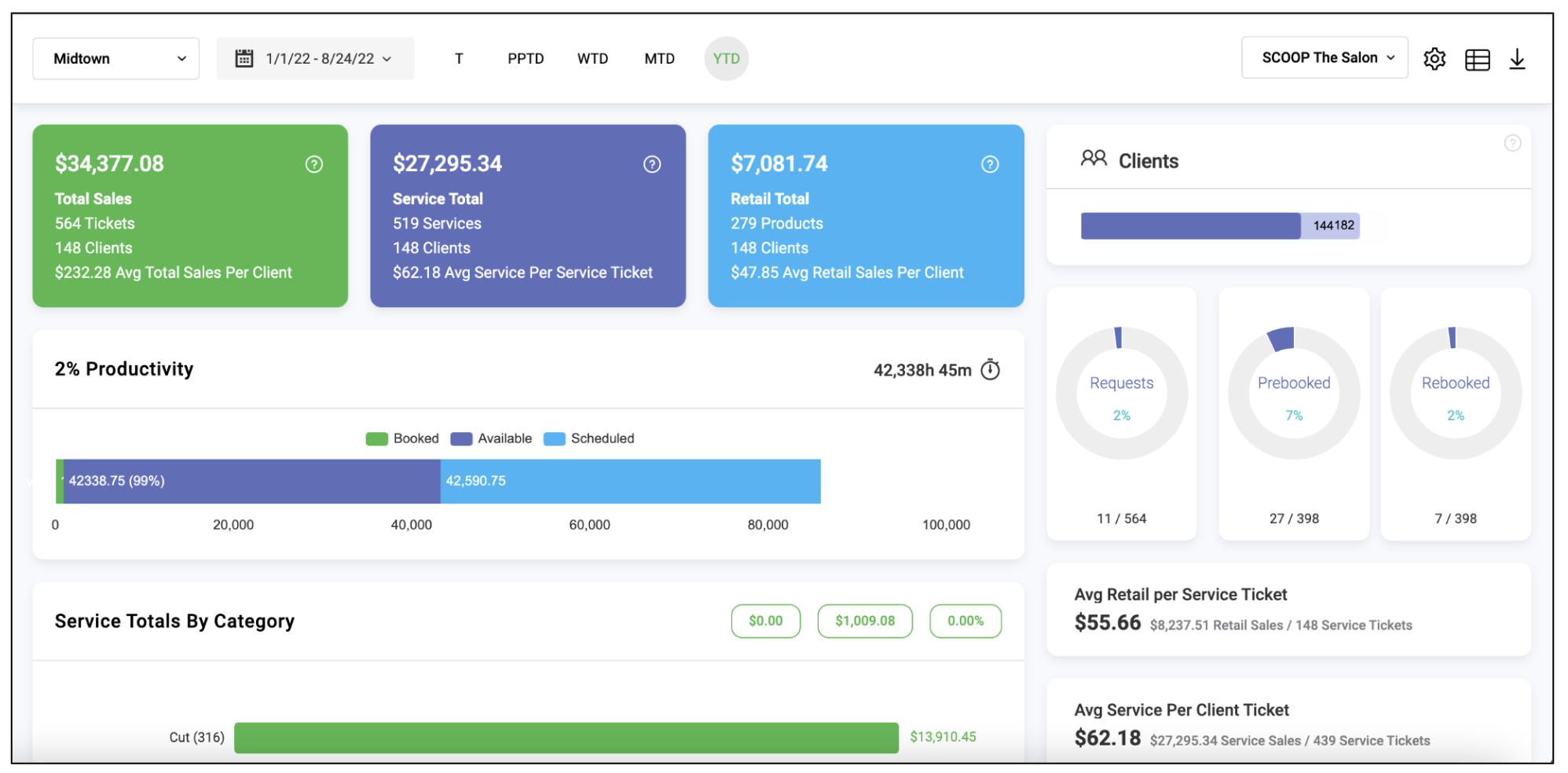
Note: to update your dashboard view, please contact your Aura Account Manager.
Purchase Order Updates
What's new:
Use the button in the upper right hand corner of a purchase order when restocking to update all received quantities to the amount ordered.
Note: you can still utilize the "quick stock" feature on the purchase order landing page if all products were received.
What's been updated:
The received column is automatically blank by default, and will highlight in green if the quantity has been edited.
Provider Access: Edit/Delete Services
Under access settings, specify if providers are able to delete services from a ticket OR edit services on a ticket to allow for more customization for employees.
Note: previously, this access setting was grouped together.
Additional Beverages of Choice
New beverages of choice under client preferences. Additions include: cider, beer, sparkling water, champagne, and mimosa.